Wednesday, March 22, 2017

Marking Period 3 Checkup

This marking period I was finally able to start streaming, and I've been able to put out a fair number of stream highlights as well. I've been taking a bit of a break from streaming due to some stress, but I'll be starting it back up again come this weekend. I also decided to get back into some music production, starting with a few experimental remixes before moving on to more original pieces.


While most of them have at least a bit of non-school appropriate language, I feel as though this highlight is still fine to use. I was also previously using a facecam, but due to my inability to find a good angle I decided against using it. I still have some framerate issues and some resolution problems, but those are related to physical equipment that I am still investing in.


I've also been getting back into using FL Studio, and even though I'm a little rusty, I still feel as though this one turned out pretty good. I still need to figure out what particular sample sets I used in some of my older pieces. I still need to render out 2 more of my remixes, and then I may move on to some more orchestral pieces. I also need to invest in a new MIDI keyboard, due to my last one breaking, as it makes creating pieces much easier since I can just play the music and the notes are added to the program, whereas as it is now I need to identify which notes are being played and manually put them in, which runs the risk of incorrect timing and missed inputs. I still need to put together the cover art for this remix above as well as my other two pieces. Seeing as this is my first new piece in six months, I will likely also make a video with an audio spectrum and post it to my music YouTube (which hasn't seen an upload in about 2 years).

Tuesday, March 7, 2017

Investigation Post - How I Built My PC

While my new PC isn't quite finished yet, it's so near to completion that I figured that there would be no issue talking about my building process. While many think that building a PC is a highly complicated and involved process, I feels as though it is more comparable to an expensive set of LEGOs.


I first started out by purchasing my case. In this instance I selected the NZXT Phantom 630 Windowed Edition, as it's large size provided me with plenty of room to work in. The chassis also came with a large array of fans, ensuring that my PC would stay properly cooled without having to purchase additional fans.


Next, I acquired my motherboard, the central hub of any PC. In this case I chose the AsRock Z97 Extreme4, a highly-efficient multi-purpose motherboard. If I was just gaming, I would have selected a more gaming-oriented board, but due to my usage of Photoshop and After Effects I opted for the more versatile option.


After that I selected the CPU. In order to have a compatible chipset with my motherboard, I bought an Intel i7 4790k, the best processor for the Z97 chipset. The fairly high quality of the onboard graphics made it a very good choice as I save up for the more expensive graphic card.


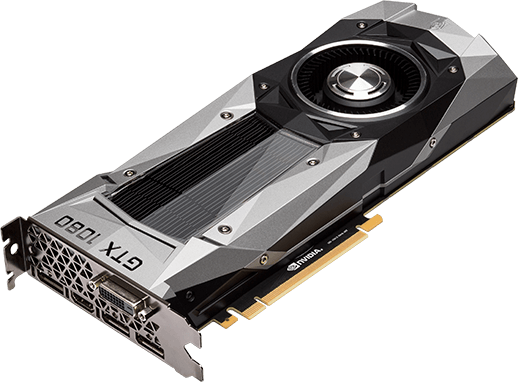
While I have not yet purchased the graphics card, it will most definitely be the most defining feature of this PC as far as completion goes. The NVIDIA GeForce GTX 1080 is the newest graphics card on the market, and its $700 price tag is well deserved for the stunning visuals it outputs.

I then purchased some of the smaller but more vital portions of my PC, including a SteelSeries Apex M800 keyboard, 4 sticks of 8 GB HyperX RAM, 2 Hard Drives, totaling 3 TB of storage space, and a 750W power supply. Even without the graphics card, this PC is a beautiful machine, able to run many programs quickly, smoothly, and efficiently. However, the acquisition of a GTX 1080 graphics card will make it so that there will be no program whose visuals are too much for my PC.

Sunday, February 26, 2017

Investigation Post - League of Legends Practice Tool


Recently a practice tool was added to League of Legends, finally satisfying a large portion of the player base and, to quote Riot Games, "finally destroying an ancient and exceedingly dank meme."

What the practice tool allows players to do is effectively utilize unlimited resources and an incredibly large time limit to test abilities or mechanics in ways they would normally be unable or unwilling to do. Prominent features include cool-down refreshing, unlimited resources, and structural immunity.


When you first enter the practice tool you are given the option to have a bot (a computer-controlled player) be in the game. This bot can have 2 difficulty settings and be any variety of characters.

You can then select your character from the ones you own, as well as configure your summoner spells, runes, and masteries.


Upon loading in to the game, it becomes very apparent that this is different, due to the large bar of options situated on the left.


Auto-Refresh Cooldowns makes it so that you can use your abilities again immediately after casting them. This is helpful for certain mechanical gimmicks like Lee Sin's ward hopping or Riven's animation cancelling.

Auto-Refresh HP makes it so that your health is always at maximum, thus preventing accidental death while practicing.

Auto-Refresh Mana/Energy causes your secondary resource bar to always be filled, preventing the sometimes annoying instances where you wish to practice something but don't have the resources to use an ability.

Add Gold instantly adds 10,000 gold to your inventory, allowing you to buy items instantly to test a character's full build.

Level-Up increases your character's level by one, up to a maximum of 18, if you want to test all of your character's abilities, while Lock XP Level makes it so that you cannot gain anymore experience or level up, if you wish to test something specifically at a certain level.

Teleport to Cursor allows you to instantly teleport anywhere on the map, perfect for going to specific areas in which you wish to practice.

Revive instantly brings your character back to life, in the event that you were dead.

Toggle Tower Invincible makes it so that all structures are invulnerable and will not die, Toggle Tower Fire makes it so that structures will not fire projectiles at opposing units, and Toggle Minion Spawn prevents the minions from progressing down the lane, and will also kill any minions already on the field.

Fast Forward 30sec causes the game to, well, fast forward 30 seconds.

Spawn Enemy Dummy and Spawn Allied Dummy will create target dummies on either side, up to 4 for each side. Clear Target Dummies will remove all of them.


There is a second page of options, which can be accessed through the arrows at the top or bottom of the tab. The upper half of Spawn options all relate to various creatures inside of the jungle, while Reset Game will start the practice session over from scratch.


The Practice Tool is something that I feel will become an incredibly important tool for people wishing to improve their skill in League of Legends, and will likely become vital in the near future to become a player at the very top of the skill ladder.


Monday, February 20, 2017

Investigation Post - OP.GG


OP.GG is a statistics tracking website for League of Legends. The website provides stats that range from the overall statistics for the winrates of various characters to the detailed match results for individual players.


The four overarching features, as pictured above, are Champion Analytics, Statistics, Leaderboards, and Pro Matches.


First up we have Champion Analytics. This section provides detailed stats on every single character in League of Legends, including Ban Rates, Pick Rates, and Win Rates in the highest-ranking tier, provided there is a large enough sample size. An example of a champion whose sample size isn't large enough is Aatrox, the first champion listed in the image above. Due to the extraordinarily low number of higher-ranking players using Aatrox in their games, there is not enough data to construct a proper data chart.


By clicking on a champion's image you can view all of the detailed statistics for that champion. Here we have selected Miss Fortune, and we are able to see her Win Rate and Pick Rate for each position that she is commonly played in. If you scroll down you can see the more successful skill orders, summoner spells, and item purchases, whereas clicking on each tab will show the Win Rates and Pick Rates for every other alternative choice. On the right-hand side there is also a set of graphs detailing the Win Rate, as well as the Pick Rate and Ban Rate if one scrolls further down. There is also a table that shows the player in this higher tier with the most number of games on this specific champion. 


We can see here that MFranky ranks at the top of these highly skilled players when it comes to playing Miss Fortune, clocking in at 345 games.


While Champion Analytics provided detailed looks at the aggregate stats of champions at higher rankings, Statistics provides a way to compare the average stats of champions at all levels of play. We can see here that if you compare the averages at all levels of play in the last month, Swain has the highest win rate, followed by Anivia. This graph can be adjusted to display various time frames or more specific levels of play, along with what specific stat is being tracked to organize the table. Clicking on the champion's name will redirect you to their Champion Analytics page.


The Leaderboards tab allows you to take a look at the ranked ladder, and see which players are the best in their region. Looking at this table, Revenge is currently the highest ranked player in North America, with a Win Rate of 58%. This leaderboard can be looked through until the bottom of the Silver ranking, the second-lowest ranked tier. 


The Champion Enthusiasts section of the Leaderboards tab allows one to look at the players in the upper skill tiers that have the most games on specific champions, just like the section in the Champion Analytics page, but in a manner that allows for more comparison.


The Pro Matches tab allows players to download replay data in order to spectate various professional players as they play their ranked games. The List of Professional Gamers section lists out the accounts that are confirmed to belong to Pros.


Finally, by entering a player's account name in the search bar at the top, you can gain access to a page that tracks a player's match history and Win Rate in detail. Here we have the page for Doublelift, who is ranked 13 on the North American Ladder. We can see here that he is ranked Challenger (The Top 200 Players in a region), that his ranked Win Rate is 54%, and that he has not played any games in the alternative "Flex" Ranked Queue. We can also see that in his last 20 games he has a 40% win rate, and we can also see that his most recent game was a loss while he was playing the champion known as Jhin. We are also able to see his average KDA (Kills/Deaths/Assists) for his last 20 games, as well as his 3 most played champions in those last 20 games.

OP.GG's database tracks statistics for every single server in League of Legends, and is available in 20 different languages. It is one of the most useful tools to determine one's own ability, as well as what choices are the most successful at the time. These statistics are constantly updated on a daily basis to ensure that you can make the most accurate decision.


Tuesday, February 14, 2017

Work Log - Week of 2/6

Monday - Adjusting Stream Overlay
Tuesday - ^^
Wednesday - Creating Thumbnail Images for Past Streams and Stream Highlights
Thursday - ^^
Friday - ^^

Tuesday, February 7, 2017

Investigation Post - StreamLabs

StreamLabs (formerly known as TwitchAlerts) is an online tool for streaming. What StreamLabs does is provide various tools such as follow alerts and donation notifications that will appear on stream and can be freely formatted with various designs, sounds, and images, which are provided or can be uploaded on your own. StreamLabs also offers a quick and easy way to process donations, as well as offering detailed analytics and timelines of various events like follows or subscriptions. StreamLabs also offers a downloadable program called StreamLabels, which produces small .txt files that contain information like the most recent follower or top donator, which can be used with the option in the Text source option called "read from file", which will display the text inside of a file. Streamers will also use StreamLabs to display versions of the chat that appear cleaner or more professional compared to simply window capturing the chat, as well as displaying the last 4 to 5 events (follows, subs, donations, etc.). StreamLabs has become a vital tool for livestreamers to interact with viewers and have a more professional stream.

Investigation Post - Sources in OBS Studio


Sources in OBS Studio are the objects that make up the scenes that are broadcast. Audio Input Capture records data from microphones or any other devices that send audio data to the PC. Audio Output Capture records the sounds from programs or all the sound being produced by the Desktop. Display Capture records the whole screen. This is a less used option due to how it doesn't really allow for professional-looking recording. Game Capture is optimized for recording gameplay. Image simply displays an image, while Image Slide Show will cycle through a set of images, and is commonly used to display a set of sponsored ads on a stream. Media Source will play Audio and Video files over the stream. Scene will add another scene, which isn't a source, so it is quite odd that it is in the menu for adding a source. Text will add a text box, which can be edited to have special effects such as stroke or slide, as well as gradient coloring. Video Capture Device will record video from a webcam or other camera device connected to the PC. Window Capture will record any specific window, and in newer versions includes the option to hide the frames that Windows adds. Deprecated currently only holds the older version of the Text source. Another option not pictured here but not present in this version is Browser Source, which will display a webpage outside of using an actual browser, which is useful when using StreamLabs or any other online streaming tools.

Monday, February 6, 2017

Investigation Post - OBS Studio

Seeing as how I've been focusing on my livestream recently, I felt as though it would be good to make an investigation on the software I have been using, known as OBS Studio. OBS Studio, OBS being an acronym for Open Broadcasting Software, is an Open-Source Livestreaming application. The newest version, called OBS Studio, contains certain features that were added to the application by outsiders due to its open source nature that have now become standard for livestreaming. Things like Browser Source (which capture a webpage itself) or Sliding Text are just a few of the features that are built in to OBS Studio that were not in the original release of OBS.


Here is an example of a standard stream layout. On the bottom we have Scenes, Sources, and an Audio Mixer, as well as Transition Settings and the various standard buttons for broadcasting.

Scenes are the various layouts of the video being broadcast, sources are the various elements contained in the scene, and the mixer controls various audio inputs, including the desktop audio.

The buttons on the right side are the standard buttons for the typical usage of OBS. Start Streaming will broadcast a video to a streaming site like Twitch, Start Recording with record a video file to the computer, Studio mode switches to a different mode that displays a preview for editing and a preview for broadcasting simultaneously, and exit closes the application.

Wednesday, January 11, 2017

Marking Period 2 Checkup


This marking period was overall not very successful, as many of the solutions I tried to use to make screen recording work on my own computer were not successful. However, I did manage to find a solution in the form of QuickTime recorder, which requires me to use the Mac in the recording booth, which limits me to recording Super Smash Bros. Melee for the time being. However, using a Mac comes with it's own issues, such as no sound, and only having access to one controller port in my GameCube to PC Adapter, an issue unique to Mac. While this does have a workaround, it is a workaround that requires administrator permissions, and as a result is a solution that I am not capable of using at this time.

On the other hand, this recording situation is merely temporary, as my new PC setup should be finished at the end of February, when I purchase my new graphics card. Until March it will need to be recorded at a slightly lower resolution, but after March I will be able to properly record all the footage I need and begin producing weekly videos.


I also did some work in Photoshop to create resources for content creators including twitch overlays and YouTube thumbnails, and I have also began editing for a Leage of Legends montage channel.

Wednesday, December 21, 2016

Investigation Post: TERA - Vista Points


In TERA there are a few hidden locations above the altitude limit and far off of the area map. These locations grant special achievements, and all are marked by a billboard known as a Wall of Wordcraft. People who find these locations are able to place a message on this wall, and despite the large number of players in the game each Wall of Wordcraft has only been found by around 500 people. The number of people who have found every Wall is even lower, and the amount of notation and documentation on these locations seems rather low in the community, something rather strange due to the rewards received for finding these locations.

Monday, October 31, 2016

Work Log for the Week of 10/24

Monday: Recording
Tuesday: Recording
Wednesday: Checking Audio Resources
Thursday: Creating Graphics
Friday: Creating Graphics

Work Log for the Week of 10/17

Monday: Marking Period Checkups
Tuesday: Marking Period Checkups
Wednesday: Testing New Jhin Build, preparing to upload.
Thursday: Marking Period Checkups
Friday: Marking Period Checkups

Investigation Post - SunnySplosion

SunnySplosion is a YouTuber who creates League of Legends content. She records gameplay with friends, edits said gameplay, and then posts it online. She occasionally streams gameplay, usually with the same friends. She frequently collaborates with other content creators to create her videos, and also works with a platform known as Team Checkpoint which functions as a platform for content creators to collaborate more easily.

Friday, October 21, 2016

Work Log for the Week of 10/10

Monday: No School
Tuesday: Updating LSI to LoL Replay, Reconfiguring
Wednesday: Recording Tests
Thursday: Recording Tests
Friday: Editing Test

Investigation Post - Imaqtpie

Imaqtpie is a former League of Legends pro player, who is now one of the most popular League of Legends players. His primary factor of entertainment is his consistently (albeit sarcastic) stating his skill at League of Legends, as well as his typically casual attitude. He is especially known for his style of talking and his catchphrase "Hell Yeah!". He has one of the best editors out there known as 2nd Sequence, who will upload his stream highlights to YouTube will a large quantity of editing to make the video even more humorous and entertaining.

Investigation Post - Scarra

Scarra is a former League of Legends pro known for his innovation in the early days of pro League, as well as his game knowledge and analysis. He typically entertains viewers simply due to the nature of his person, along with his skill as a player. He will upload Patch Analysis videos whenever Riot Games releases and update to League of Legends. He is known for his pro career on the now defunct Team Dignitas. Similarly to Rush, Scarra has an editor who will upload stream highlights to YouTube, but sometimes Scarra himself will stream on YouTube.

Investigation Post - Rush


Rush is a former League of Legends player turned streamer. He focuses mainly on playing to entertain viewers, and will frequently play characters where they shouldn't be played and winning with absurd builds due to his mechanical skill and sizeable gameplay knowledge. He is known for his pro careers with North America's Team Impulse and Cloud 9. His humor is more or less joking about how poorly the enemy team plays, messing with friends, or freaking out when he makes a bad mistake. He has an editor who posts stream highlights to YouTube.

Investigation Post - MagikarpUsedFly


MagikarpUsedFly is a YouTuber who creates content for League of Legends. He creates gameplay videos and also has a creative series known as "Actual Champion Spotlights", which parody the Champion Spotlights that are released by Riot Games to detail new champions. He is known for being a generally positive influence on the League community and tries to promote nontoxic behavior within the community. His humor tends to focus on freaking out about potentially broken mechanics or just making jokes with his friends.

Tuesday, October 18, 2016

End of Marking Period

This marking period I have been working on editing and trying to record footage for League of Legends. For the most part I have just been figuring out how to use some effects in After Effects, and I have been trying to record my own footage, to mixed success. The biggest issue with recording footage off my own computer is that the resolution of the recording is odd, and the framerate is rather poor, often being really low or skipping. There is also the issue of recording the sound of my PC, which requires spending $15 a year, which, while rather low, is also a questionable decision depending on whether or not this program ends up working well. I have also been working on a script for a semi-comedic video spotlighting a Support Jhin build, which will feature primarily motion graphics, some of which are already completed.


Tuesday, October 11, 2016

Work Log for the Week of 10/3

Monday: Testing Screencast-O-Matic
Tuesday: Setting up LoL Replay
Wednesday: Music, Talk About Grades
Thursday: Music
Friday: No School